


Information about managing organizations and housing stock is collected in the GIS system of housing and communal services. Each citizen can go to the website of the information system and get all the necessary information about their home.
GIS housing and communal services — an information portal that brings together service providers, homeowners and municipal authorities. But if registration is required for suppliers here, then users can do this for their own convenience, since logging into the personal account of the GIS housing and communal services allows you to receive up-to-date information on tariffs, debts, upcoming repairs, make payments or send complaints online.

GIS housing and communal services is a state information system of housing and communal services. It united owners, managing organizations, resource-supplying organizations, as well as authorities.
This resource allows citizens to obtain information about their managing organization, transfer meter readings, as well as send an appeal or complaint to their managing organization, which are registered in the system and their execution is controlled by supervisory authorities. All managing organizations and HOAs, in turn, are required to post information about their activities here.
- Key features
- How to register in the GIS housing and communal services
- Register for Public Services
- We enter the personal account of the GIS housing and communal services
- Main architectural solutions
- Functional decomposition
- Development technologies
- Hardware and software complex
- Great functionality in a short time
- The most common hardware and software
- Scaling for the whole of Russia, work 24×7
- Support for different clients to access the system
- Loading and storing documents
- Interaction with related systems
- Registration in the GIS housing and communal services for an individual
- How to find your home in the GIS housing and communal services?
- Search for a house by address
- Search for a house by managing organization
- Search for a house by CHI
- What information about the house is in the GIS housing and communal services?
- Registration of a personal account of the GIS housing and communal services on the website dom. gosuslugi
- Login to the personal account of the GIS housing and communal services through the State Services
- Payment of utility bills on any personal account
- How to check the house?
- Registration in the GIS housing and communal services for a legal entity
- Creation of a verified account of an individual in the ESIA.
- Registration of an organization’s account in the ESIA.
- Adding employees of the organization to the ESIA.
- Registration of the organization in the GIS housing and communal services.
- How to file a request or complaint
- GIS Housing and Utilities Support Service
- And you are so cold
- How to make housing and communal services so that it is a GIS
- Subsidies, benefits
- How to find?
- Connecting a personal account to a personal cabinet
Key features
In his account, the user can perform the following actions:
In addition, the user can transmit meter readings (meters), receive information about landscaping, as well as data on their property, for example, on the timing of major repairs, contracts, cost and quality of services provided.
Not everyone knows, but our country is moving towards a bright future, when these problems will be solved and we will be able to solve many issues in the field of housing and communal services via the Web or mobile phone in the same way as it is now possible to do in banking or other advanced areas of online industries.

In accordance with the Federal Law of July 21, 2014 No. 209-FZ and the RF LC, a state information system for housing and communal services (GIS HUS) is being created in Russia. The state customer of the GIS housing and communal services is the Ministry of Telecom and Mass Communications of Russia. Work on the implementation of the system and the creation of a regulatory framework is carried out by the Ministry of Telecom and Mass Communications of Russia together with the Ministry of Construction of Russia. Funding for the creation of the system is carried out at the expense of the System Operator (FSUE Russian Post). The LANIT team is engaged in the development of GIS housing and communal services «from scratch».
Since July 2016, the system has been in commercial operation at http://dom.gosuslugi.ru. The system continues to increase its functionality, and is also rapidly filled with data.
GIS HUS is functioning and developing. The efforts of everyone who makes this system were recently noted at the CNEWS forum — our system was recognized as the best IT project in the Modern Country nomination of the CNews AWARDS 2016.
This was a review article. In it, I was able to touch on only a few of the most important issues superficially, but it still turned out to be long. In the following articles, we can already focus more on some specific aspects of the implementation of the GIS housing and communal services, which are now left out. For example, this is the organizational structure and project management scheme, release management solutions, information security solutions, configuration and monitoring issues, ensuring system availability, filling with reference data, solutions for interacting with Rosreestr, credit organizations, solutions for delimiting access rights and delegating rights and many others.
Write in the comments what topics you are more interested in about GIS housing and communal services, we will try to talk about them first.
In the GIS housing and communal services throughout the country, data is entered on organizations (management companies — management companies, resource supply organizations — RSO, etc.), on houses (multi-apartment and residential). The figure below shows a map of the implementation of the GIS housing and communal services (see https://dom.gosuslugi.ru/#!/implementation-map — corrected on 08/13/2018), where successful and lagging regions are marked in color.
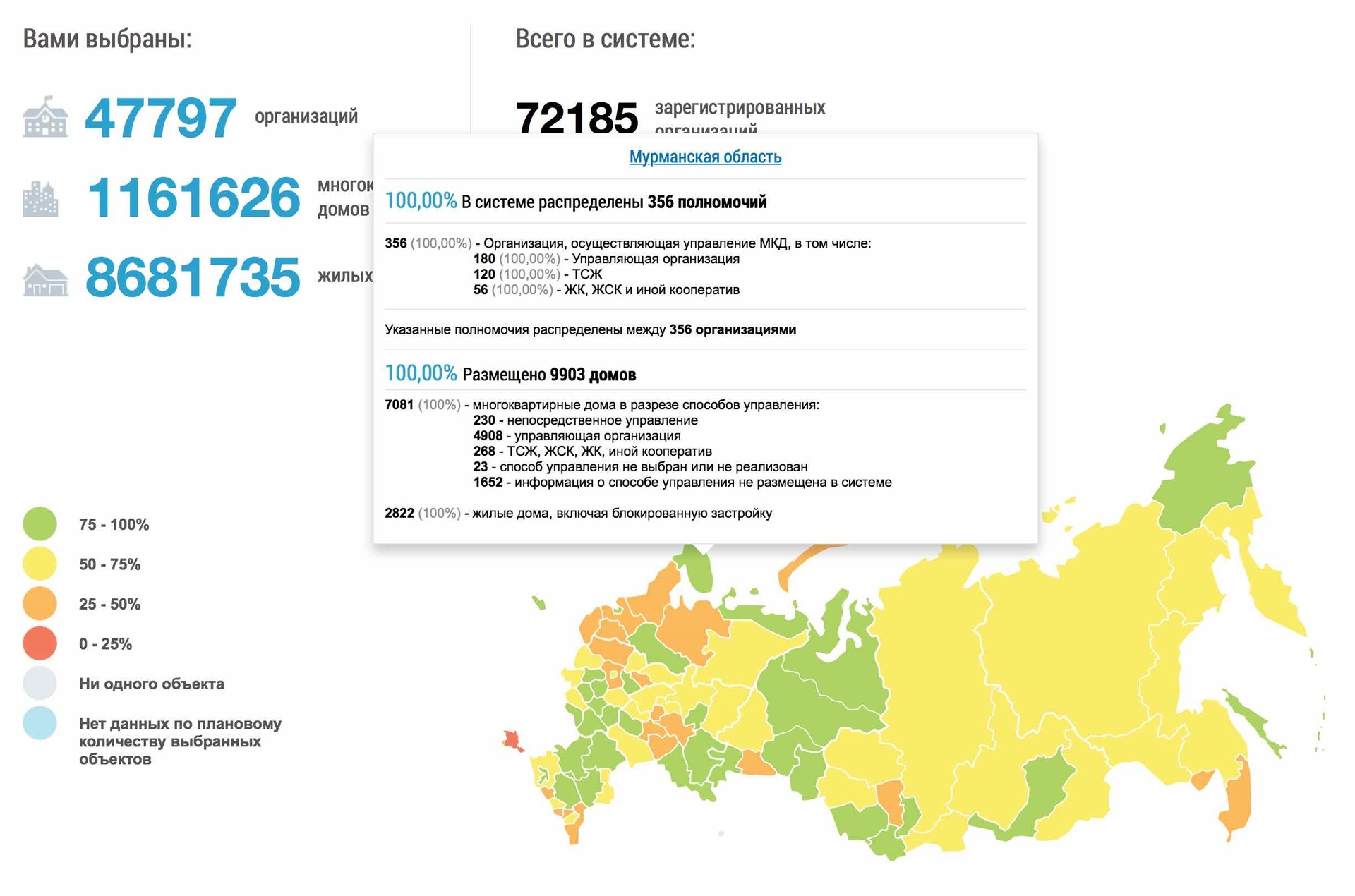
For example, a map of the introduction of one of the advanced regions — the Murmansk region is given.
I found a house in Astrakhan where I once lived a long time ago and was able to view basic information on it, as well as information about organizations related to it (UK, RSO, local governments).
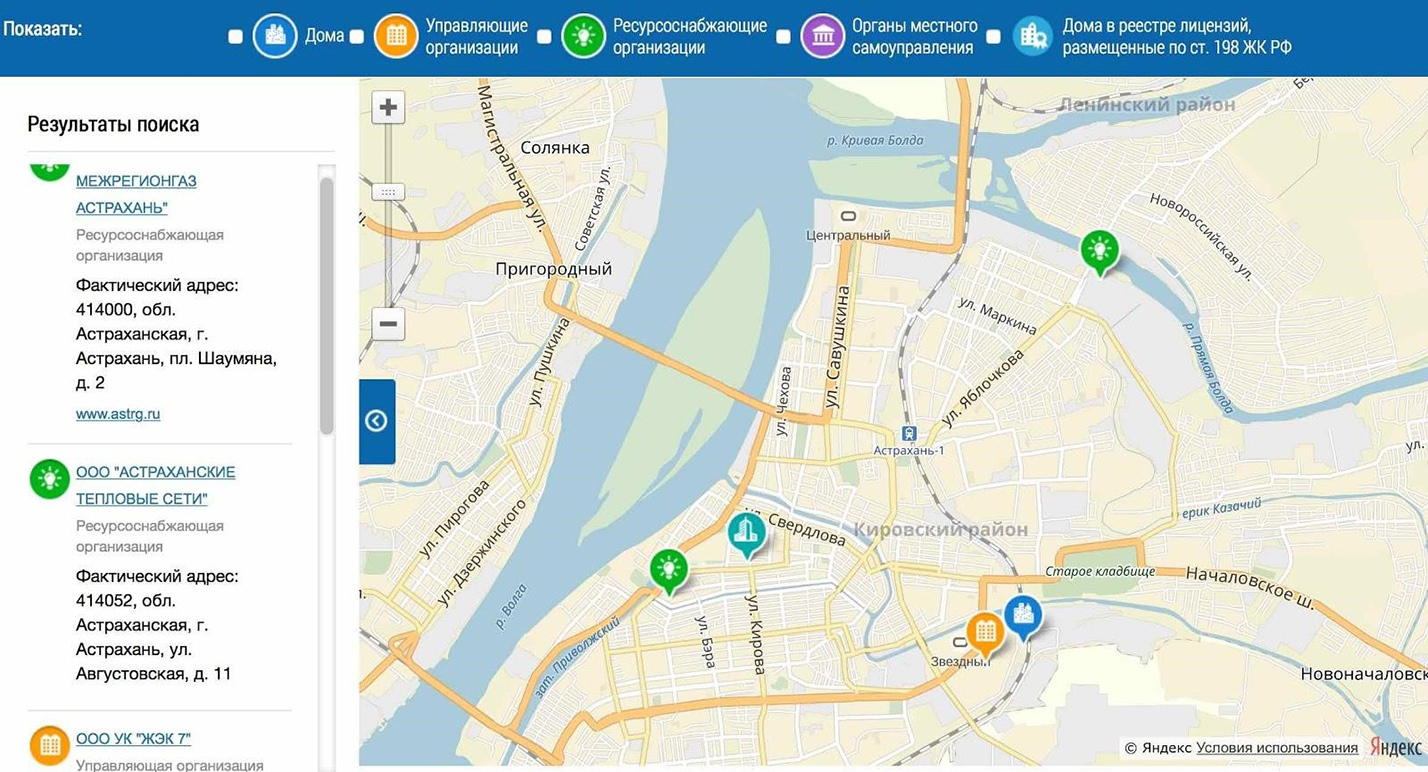
House and related organizations on the map
I also studied information about the managing organization that serves this house. Acquainted with the license of this organization. It turned out that she manages 40 apartment buildings, and over the past year she has “fallen” on fines several times.
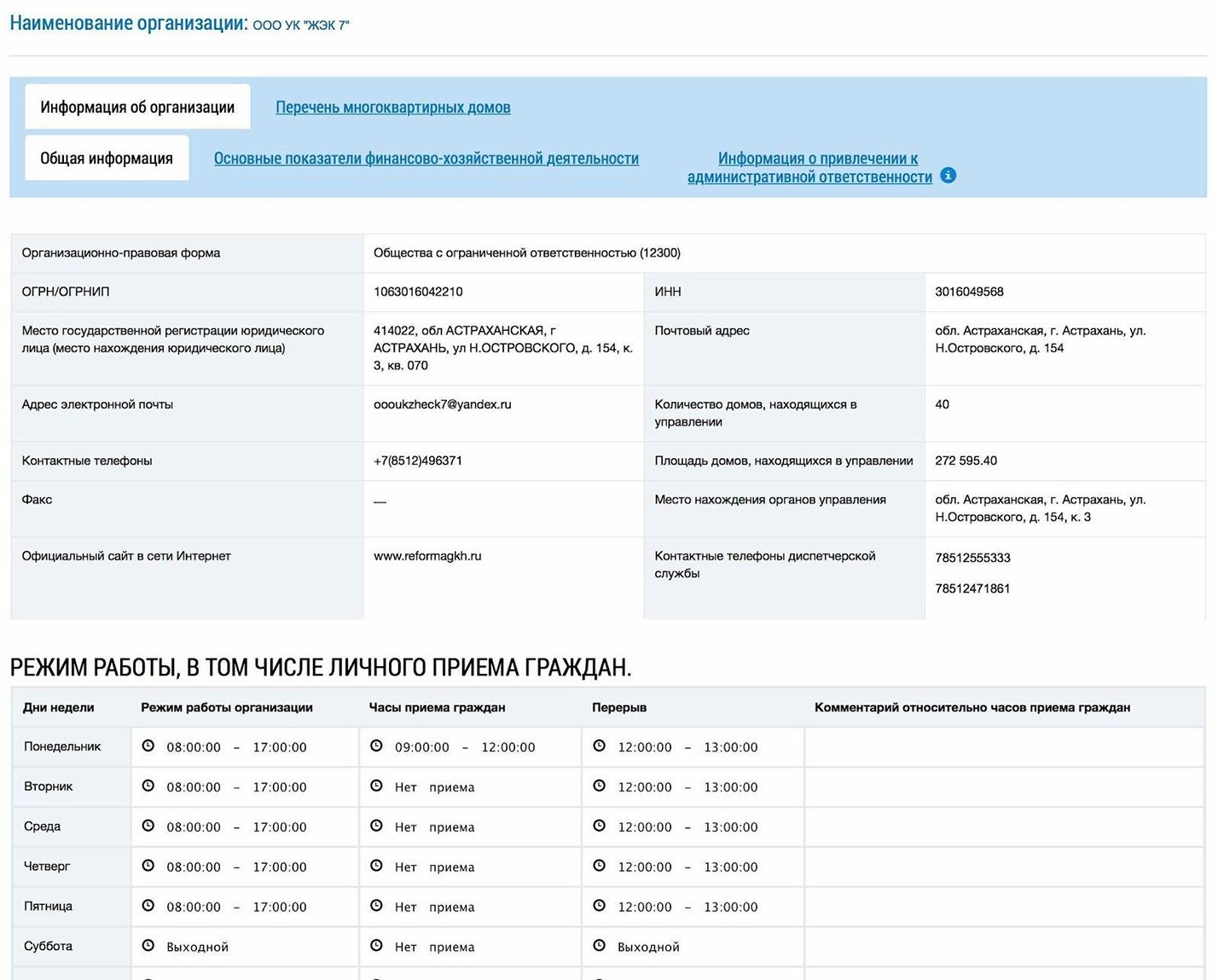
Information about the managing organization
Everyone can already do the same on their own. In the following articles, we will try to talk about this in more detail and describe what else interesting and useful things can be done using the GIS housing and communal services.
In your personal account, everyone can see information about all the real estate he owns. This information is automatically pulled from the Rosreestr database. Also, through your personal account, you can ask a question or send an appeal to the authorities or to your management company. In addition, in the GIS housing and communal services, you can see charges for housing and communal services, the volume of utility services provided, you can transfer meter readings, you can pay for utilities services without unnecessary intermediaries and additional third-party sites. These functions are available now (provided that your MC has entered the necessary data, more on that below) and their number is constantly increasing. We will try to announce the most interesting and useful ones on Habré with a detailed story “how, why and for what”.
I recommend watching the story of the Deputy Minister of Telecom and Mass Communications Mikhail Evraev at the CNews forum about the possibilities of GIS housing and communal services.
I was lucky enough to work on a project to create a state information system for housing and communal services (hereinafter referred to as the GIS housing and communal services) as an architect and head of system development since 2014, i.e. from the very beginning. In this post I will try to talk about what it is and how the key decision-making processes looked from the inside when developing a large information system. Very large information system.
I want to say right away that this post was conceived as an introductory one, which will allow you to look at some aspects of the implementation of GIS housing and communal services from a bird’s eye view and identify the most interesting topics for further coverage. In subsequent posts, we plan to dwell in more detail on specific issues of implementing the GIS housing and communal services.
Over the past 5 years, my life has largely gone online, and this fact allows me to save a lot of energy, freeing up a lot of time. For example, I like to be able to buy a theater or movie ticket without getting up from the couch. I like to choose my seat on the plane and book a hotel without leaving home. I love that my bank has no offices and that I do 99% of all my banking transactions online. I like to order a taxi with a couple of button presses on my smartphone and avoid traffic jams (well, almost) thanks to online navigators. I get the feeling that finally Internet technologies have reached a level at which they began to bring really real benefits to people.
In many industries, technology has long moved online, but in the field of housing and communal services, things are not quite the same, or rather, not at all. Many residents can already perform basic operations through the public services portal (such as paying bills or entering meter readings). As a resident of Moscow, of course, it’s a sin for me to complain, but I would like more and better. For example, I pay for part of the services on the website of my management company, electricity on the Mosenergo website, capital repairs fees on the public services portal. It so happened that at one “beautiful” moment I forgot about Mosenergo, and the electricity in my apartment almost turned off. I had to drop everything and urgently go to the Mosenergo office in order to eliminate the resulting debt.
Judging by the opinions of relatives, friends and acquaintances, things are much worse in many regions. My parents live in Astrakhan and solving issues in the housing and communal services sector also gives them considerable inconvenience. For example, they still spend their time every month personally submitting paper meter readings to the management company. Their other headache is that there is no single resource where one could see all the information about invoices and payment facts. Providers of various services periodically lose information about payments, debts arise, and in order to sort it out, they have to come to the office of a particular service provider along with a pile of payment receipts.
I think that everyone can give their own examples of problems in the field of housing and communal services that cause trouble and make them waste their time.
How to register in the GIS housing and communal services

State information system of housing and communal services — GIS housing and communal services — is a resource in which you can receive a number of public services in the field of housing and communal services. You can, for example, pay for utility services online, submit meter readings, monitor the work of the organization managing the house — this is convenient for many.
Register for Public Services
To complete the initial registration on the State Services portal:
Next, in the personal account of the State Services, you need to confirm your identity: add your passport and SNILS data (the “Fill in the profile” button) and click “Save”. When the data is verified by the Ministry of Internal Affairs and the Pension Fund of the Russian Federation, you will already have a standard account. Usually the check takes about 15 minutes, sometimes more. You will receive a notification with the result on your mobile phone or email address, and the corresponding status will also be displayed on the site.
It is not necessary to indicate exactly passport data, you can also choose another identity document.
Next, you need to verify your account. There are several ways: to personally visit the service center, request a letter with a confirmation code at the State Services, or confirm online through the Internet banking of Sberbank, Tinkoff Bank or Post Bank.
Confirmation via customer service center
Specialized service centers where you can confirm the account of the State Services are multifunctional centers, branches of the Russian Post, the Pension Fund, the Office of the Ministry of Internal Affairs of Russia, offices of Rostelecom, bank branches.
On the personal information page, you can click “Find a nearby service center”, select a conveniently located center and visit it. You need to take your passport with you (or another identity document, the details of which you entered when registering on the site) and SNILS — these documents will need to be presented in order for your account to be confirmed.
In order for you to be able to use all the functions of the State Services portal, as well as gain access to the GIS housing and communal services, after visiting the service center, log out of your account on the State Services and log in again. You now have a verified account.
Confirmation by registered mail
An email with an identity verification code will be sent to the postal address you provided. The code is sent by registered mail, that is, you will receive a notification in the mailbox to receive it at the Russian Post office. There it will be necessary to present an identity document and a notice. The average delivery time of a letter is about 2 weeks from the date of sending.
To have an email sent to you, click on the “Verify Your Identity by Registered Mail” link (this link is located on the account status view page, under the “Find Nearest Service Center” button). Enter the address and click «Order». After you receive a letter, enter the confirmation code indicated there in your account on the personal data page. You will receive an SMS that your account has been verified.
Please note that after confirming your account by registered mail, you will not be able to use the taxpayer’s personal account on the nalog.ru portal.
Confirmation via Tinkoff Bank
You can confirm your Gosuslug account through your personal account or the Tinkoff Bank mobile application. The method is suitable for Tinkoff Bank clients and is convenient in that the confirmation takes place online — you don’t need to go anywhere with documents.
The confirmation procedure through the mobile application is similar: you need to click on the last name and first name at the top of the screen and select the “Registration for Public Services” section.
Confirmation via Sberbank
Log in to Sberbank Online, open the “Other” tab and select “Registration for Public Services”. Fill out an application for registration. After receiving the notification, log out of the account on the Public Services and log in again — the account status will change to “confirmed”.
Confirmation via Post-bank
To confirm through Post-Bank, you must first create an account on the State Services, the account status must be “standard”. Sign in to Post Bank Online. In the «Pay» section, select «Public Services» and click «Verify Public Services Account».
We enter the personal account of the GIS housing and communal services
Having a verified account on the State Services, you can also use the functionality of the GIS housing and communal services.
GIS housing and communal services is one of the projects of the State Service portal.
You can pay for a communal apartment, submit meter readings, write appeals to the authorities — all the functions of the GIS housing and communal services are now available to you.
Main architectural solutions
As a result of the study of many options and alternatives of architecture, we came up with solutions that are best suited for the implementation of GIS housing and communal services.

Functional decomposition
GIS housing and communal services is decomposed into several blocks, each of which includes a set of components that are closely related to each other in terms of business and / or perform an independent technical function.
We distinguish the following main blocks, including components related to:
This decomposition allows for a more manageable project structure under tight deadlines, high intensity of changes, and has far-reaching consequences, since the organizational chart of the project is also built around it and since it significantly affects the scaling of the system and many other aspects.
It was decided not to use decomposition (sharding) on a territorial basis, for example, to make a set of regional nodes, a federal node, perhaps deploy them in different geographically remote data centers, etc.
The division of the system on a territorial basis for the GIS housing and communal services was recognized as inappropriate, since all the pluses are outweighed by the minuses:
Functional subsystems use a single file storage for uploading and storing documents, which is a specialized solution that provides efficient storage of large amounts of data.
Development technologies
Functional components include several levels:
A layered framework is used to support different interfaces: browser-based user interface, integration interface, mobile interface, and potentially necessary other interfaces.
The following technologies are used to develop functional components.
For client interface:
For integration interface:
The specified set of technologies is used as a standard for most functional components. In general, at the initial stage, we did research on the possibility of using NoSQL technologies to implement functional components, because it is believed that these technologies are tailored to solve the problem of database scaling (see a small overview report). However, as a result, we came to the conclusion that this would be unjustified. The decomposition of the system into functional components, the capabilities of the hardware and the PostgreSQL relational DBMS allow us to achieve the desired level of scalability in a more efficient manner and with less risk. Taking into account the statistics of the industrial operation of the system to date, we can say that this decision was correct.
Of course, other technologies are used for specific tasks. For example, a NoSQL key-value database is used to implement file storage, because this allows you not to use expensive storage systems for storing large amounts of documents, but to use cost-effective servers with internal disks, as well as provide the ability to effectively scale to hundreds of TB of data.
If in the future we encounter PosgtreSQL scaling limits for any functional component, then we can review its implementation, including using NoSQL database.
It was decided to abandon the Spring Framework (with rare exceptions) for simplicity due to the fact that all the necessary services are provided by JavaEE.
Hardware and software complex
For the functioning of the GIS utility software, a set of servers (virtual or physical) is required that have characteristics expressed in certain parameters: the number of processors, the amount of RAM per processor, IOPS requirements for disk memory, the operating system used, etc. However, how in reality these indicators will be achieved (what vendor’s equipment will be used, what virtualization system will be used, etc.) is not so important.
On the other hand, during the operation of the GIS housing and communal services, the Operator faces a difficult question of how to provide the GIS housing and communal services with the necessary equipment so that, on the one hand, it provides the required performance and reliability, and on the other hand, so that it does not stand idle . The issue is complicated by the fact that the amount of technical capacity required for the GIS housing and communal services at some point in time depends on many factors: on the terms by which, according to the legislation, the necessary data must be entered into the system, on how much demand these or those functions of residents, etc. The value and number of these factors is changing all the time.
Therefore, the so-called “cloud” approach is used for the GIS housing and communal services: the capacity of the HSS and how it will be increased are formulated in terms of virtual machines and the unit resources required for them over a period of time. The engineering departments that design PACs think ahead about how to “shift” these requirements into specific equipment specifications.
In more detail about the device of the “cloud” of the software and hardware complex, we intend to tell in a separate post.
In principle, a GIS for housing and communal services could be implemented in a dozen different ways. How it looks in the end is primarily determined by the requirements of the State Customer and the Operator. Some requirements directly entail specific consequences, others allow for various variations, which we, as a developer, evaluated based on our experience, capabilities and advantages of our team. Below I will give the main requirements that were imposed on the GIS housing and communal services at the initial stage of the project.
Great functionality in a short time
One of the most important features of the project is the need to implement a very large functionality in an extremely short time in the face of constant changes and refinements. The fact is that the “waterfall” approach, in which at first a federal law is written for one or two years, by-laws are adopted, then software is developed for two or three years, a software and hardware complex is deployed, the system is tested and then transferred to commercial operation would lead to to the fact that the system would reach industrial capacity in five to seven years. In addition, it is possible that during the time that the legal framework was formed and the system was designed for it, the housing and communal services sector has already changed significantly and many things have become irrelevant.
For us, as developers of GIS housing and communal services, this means the need to develop and implement GIS software for housing and communal services in small iterations, taking into account the accumulated experience, emerging changes and clarifications.
The following main milestones of the project can be identified:
The most common hardware and software
The project to create a GIS housing and communal services started in 2014 in the context of difficult relations with the West. Therefore, one of the most important requirements of the State Customer and the Operator was the complete rejection of the use of unique equipment and software from Western vendors in favor of the use of open architecture and open source software.
For our development team, which at that time had the greatest experience of working on the technologies of world vendors, this was a serious challenge. Serious work has been done to search and analyze the entire open source market in order to select technologies that are most suitable in terms of functionality.
Scaling for the whole of Russia, work 24×7
GIS housing and communal services serves all participants of the housing and communal services market.
The main target parameters include (these are not real numbers, but targets that the system must withstand):
The main users of the system are residents of Russia, but the use of the system, of course, is not limited to the territory of our country. The main activity of users falls on the period from 7:00 to 18:00 local time. In order for every resident of our country to be able to use the GIS housing and communal services at a convenient time for him, the functioning of the system is ensured in 24×7 mode.
If any work is not possible without shutting down the system, then they are carried out during the period of routine maintenance, which are mainly appointed in agreement with the Operator for the period from 21:00 to 00:00 Moscow time.
In general, at the initial stage it is difficult to predict what load will be applied to the system. If you overestimate the potential load, then you can choose technologies and architecture that will be unreasonably difficult to develop and operate. This can lead to extremely high labor costs and terms for creating the system.
Support for different clients to access the system
Residents of our country, as well as employees of the management company, RSO and authorities at all levels have the opportunity to work with the GIS housing and communal services through a web browser. In addition, a separate mobile client is provided that allows you to perform the main functions of the system for residents (the product has not yet been launched).
In a number of regions, at the time of the project initiation, local regional housing and communal services systems were already implemented and used, in which the processes of this region were already automated. The introduction of the GIS housing and communal services should not have broken the established regional practice and destroyed their developments, therefore the GIS housing and communal services in such regions should work through regional systems and integration interfaces.
Many resource-supplying organizations and management companies are small organizations without developed IT services, so the GIS housing and communal services had to focus on the work of such organizations through a Web client and uploading/downloading data using XLS files. However, there are large enterprises with advanced automation tools that serve hundreds of homes and thousands of households. For them, GIS housing and communal services provides developed integration interfaces for interaction with such organizations.
In fact, it turns out that we do not have a main interface — at least the web interface and the integration interface can be considered equivalent in importance. What does this mean in terms of system architecture? This seems to hint that it would be better to separate the general business logic from the logic of displaying on the web or accessing through integration services. On the one hand, this will increase the complexity of deploying a GIS housing and communal services, but it will minimize duplication of logic and potential errors.
Loading and storing documents
Despite the fact that the GIS housing and communal services emphasizes the storage of data in a structured form and the general movement towards the transfer to electronic form of processes, for example, the conclusion of contracts, voting, etc., however, now many functions imply (or allow) uploading unstructured or semi-structured documents — scans, text documents in various formats, photographs, etc. The volume of documents uploaded to the GIS housing and communal services can be tens of terabytes per year.
Storing and making documents available in such volumes is not a trivial task, given the following aspects:
Interaction with related systems
The work of the GIS housing and communal services requires data from various federal resources and departments, as well as interaction with credit organizations.
Main counterparties of the system:
GIS housing and communal services interacts with federal resources and credit organizations through the system of interdepartmental electronic interaction (SMEV).
Interaction with the above information bases and systems can easily be called separate large projects that deserve a separate post or even a series of posts.
Registration in the GIS housing and communal services for an individual
There are several options for registration in the GIS housing and communal services (Fig. 1):
You yourself choose the registration method that is convenient for you: online through a bank, through a service center or another registration method. After registering, verify your account. When registering online through a bank and when visiting a service center in person, a verified account is created, i.e. you do not need to perform additional steps to confirm your registration.
If another registration method was chosen, then it is necessary to confirm the account either by a personal visit with documents to the service center, or by registered mail via Russian post, or using an electronic signature (Fig. 2):
How to find your home in the GIS housing and communal services?
There are 3 ways to find your home in the GIS housing and communal services through the official website:
Search for a house by address
To find a house by address, you need:


The screen will display information about the apartment building and its main characteristics: cadastral number, year of commissioning, number of floors, managing organization, etc. (Fig. 3).

The color of the house means its condition: green — the house is in good condition, yellow — dilapidated, red — emergency house, gray — information about the house is not placed in the system.
Using the links below the characteristics, you can open information about this housing stock, information about service providers, information about compulsory medical insurance, an electronic passport for the house.
Search for a house by managing organization
To find the required object by the managing organization, you must:


In the list, you can find your house and view information about it.
Search for a house by CHI
In addition to the above methods, a house can be found by municipality. For this you need:


You just need to find the right one.
What information about the house is in the GIS housing and communal services?
The list of information posted about an apartment building in the GIS housing and communal services is contained in the Order of the Ministry of Telecom and Mass Communications of the Russian Federation and the Ministry of Construction and Housing and Communal Services of the Russian Federation dated February 29, 2016 N 74/114 / pr «On approval of the composition, timing and the frequency of posting information by information providers in the state information system of housing and communal services. Thus, the GIS housing and communal services contains the following list of data:
Managing organizations that manage these multi-apartment buildings are obliged to post information about apartment buildings.
All information contained in the state information system of housing and communal services is official and reliable. For violation of the terms, procedure and method of posting this information, organizations face administrative liability under Articles 13.19.1 of the Code of Administrative Offenses of the Russian Federation «Violation of the procedure for posting information in the state information system of housing and communal services» and 13.19.2 of the Code of Administrative Offenses of the Russian Federation «Non-posting information, posting information not in full volume or placement of false information in the state information system of housing and communal services.
Registration of a personal account of the GIS housing and communal services on the website dom. gosuslugi
The easiest way is to register your personal account of the GIS housing and communal services through the State Services (ESIA). To do this, the user needs:


There is no other way to enter the official website of the GIS housing and communal services — the user must have an account on the State Services, and a confirmed one.
Login to the personal account of the GIS housing and communal services through the State Services
Logging into the information system occurs automatically.
Payment of utility bills on any personal account
To pay utility bills, you need to log in to the official website through the State Services, after which the system provides the opportunity to make a payment:

Using this section of the account, you can pay for utility bills on any personal account, including that owned by an outsider. The main thing is to choose the right contractor and enter his current account.
How to check the house?
To view information about a house in the GIS housing and communal services, you only need to find out the address of the house.
To view the passport of the house at the address, you need to find the necessary house in any of the ways and follow the link «Electronic passport of the house» (Fig. 8).

Here you can find all the detailed information about the apartment building, including its technical characteristics. The completeness of this information depends on the organization that is responsible for managing this object.
Registration in the GIS housing and communal services for a legal entity
The process of registering an organization in the GIS housing and communal services can be conditionally divided into several stages:
Creation of a verified account of an individual in the ESIA.
Creating an account at the first stage is no different from registering an individual on the State Services. The head of the organization is registered in the ESIA as an individual in any way possible.
Registration of an organization’s account in the ESIA.
To create an organization account, log in to your account on the ESIA login page https://esia.gosuslugi.ru (Fig. 3):
On the displayed “My data” page, click on “Add organization” (Fig. 4):
In the «Add organization» window, select «Legal entity» (Fig. 5):
Next, you will be taken to a page with a small instruction on how to add an organization. Follow the instructions to connect the electronic signature.
IMPORTANT: To register an organization, you must use an enhanced qualified electronic signature obtained from an accredited center in the name of the head of the legal entity.
To continue registration, click «Continue» (Fig. 6):
If there are multiple digital signature verification key certificates, a certificate selection window will be displayed. After selecting the certificate, a PIN code entry window will be displayed, enter it and click «Continue».
Next, the form for entering data on the legal entity and the head of the organization will be displayed (Fig. 7):
Some of the fields may already be filled in with the data read from the electronic signature. Information must be entered in the blank fields.
Next, click the «Continue» button and wait for the completion of the verification of the organization’s and manager’s data in the Federal Tax Service.
A legal entity will be registered if there are no errors in the information entered.
Adding employees of the organization to the ESIA.
To add employees, go to the «Organizations» tab. Next, select your organization and go to its card (Fig. 8):
On the displayed tab, select the “Employees” item (Fig. 9):
The employee details tab will be displayed. To add a new employee, you need to click on the «Invite employee» button (Fig. 10):
The New Employee window will be displayed. You need to fill in the required fields. We recommend that you fill out the «SNILS» field to be sure that another person cannot use this invitation. To add a person to the Organization Group Administrators group, you can check the corresponding box. And click the «Invite» button (Fig. 11):
Important! Only a user with a verified account can join an organization.
To grant access rights to employees of the organization to the GIS housing and communal services, go to the «Organizations» tab, select the organization and go to its card. Next, click «System Access» (Fig. 12):
Using the advanced search, you need to find the State Information System of Housing and Communal Services (Fig. 13):
In the «Groups» field, select the required group. To add an employee, click «Join a new employee». The Edit Team Members window appears. Enter the employee’s last name, select the required one from the options provided and click «Add» (Fig. 14):
Registration of the organization in the GIS housing and communal services.
Registration of an organization in the GIS housing and communal services is carried out only by the head of the organization with the role of «Administrator of the organization».
On the tab «Information about the organization» the form «Registration of the organization in the GIS housing and communal services» will be displayed (Fig. 17):
The fields display data received from ESIA. The information is not editable, except for the Abbreviated Name, Phone, and E-mail Address fields. It is necessary to fill in the missing information in the «General Information» block. Fields marked with an asterisk «*» are mandatory.
Next, you need to add the functions of the organization by clicking on the «Add function» button (Fig. 18):
The «Add Function» window will be displayed. Select the required functions from the drop-down list and click the «Save» button (Fig. 19):
After reading the user agreement, check the box “I accept the terms of the User agreement on behalf of the organization (individual entrepreneur) and click the “Next” button (Fig. 20):
The Organization Representative Information tab will be displayed. It is necessary to check the information already available and fill in the «E-mail address» field. Next, after reading the User Agreement, check the box «I accept the terms of the User Agreement on my own behalf» and click the «Register» button (Fig. 21):
Next, the system performs a function check. If the verification is successful, then the functions receive the status «Confirmed». And a record about the organization appears in the Register of information providers and becomes available for viewing in the open part of the GIS housing and communal services.
How to file a request or complaint
The profile has functionality that allows you to contact the supplier or send a complaint. Also, the owners of the premises can provide information, ask questions, receive instructions. For this you need:

GIS Housing and Utilities Support Service
The easiest way to contact the support service is to log in to your personal account and click on the corresponding icon at the top right of the information panel. Beforehand, you can try to find answers to questions on your own in the section with frequently asked questions.
If you failed to do this, you need to:

Answers are received within 24 hours to the mail that the user indicated in the form.
And you are so cold
All the listed conveniences for users are just the tip of the iceberg of the GIS housing and communal services. In order for all this to work, it is necessary that management companies, resource-supplying organizations, local governments, regulatory authorities and all, all, all other participants in long-term housing and communal services business processes enter high-quality information into the system in a timely manner. And that’s where we usually have our biggest problems. It seems that there is an obligation, but it is not always possible for many to fulfill it conscientiously.
Therefore, for information providers, the state at the legislative level provides for administrative responsibility, as well as the most understandable and effective economic motivation: starting from January 1, 2018 (initially it was from 01/01/2017, but then the deadlines were postponed) in case “if the system does not contain information on the amount of payment to be paid by the consumer for residential premises and utilities, or information is posted that does not correspond to the payment document submitted to the consumer on paper, the payment document is considered not submitted in accordance with the requirements of the legislation of the Russian Federation «(see. 209-FZ of June 21, 2014 and the draft law on the postponement of liability). Thus, until an account appears in the personal account of each user of the GIS housing and communal services, the service will not be considered rendered. Remember that the accounts in the GIS housing and communal services are the only true ones!
And now, finally, let’s talk about the technical side.
How to make housing and communal services so that it is a GIS
Time to read
In the country at http://dom.gosuslugi.ru a unified information resource in the field of housing and communal services has been created and put into commercial operation — the state information system of housing and communal services (GIS housing and communal services). The goal and the most important task of the system is to finally make housing and communal services completely transparent and provide the population with ways to strengthen public control in such an important area. The article briefly describes some of the features of the GIS housing and communal services that are available to all residents of our country today, as well as an overview of the main architectural solutions and technologies that made it possible to meet the deadlines and provide the necessary performance characteristics of the system.
Subsidies, benefits
The account provides the function of obtaining a subsidy and reimbursement of expenses. To apply, go to the section of the same name, then:

To view the debt you need:
In the request date column, you can select the period for which the report will be generated. A period of 12 months is automatically set, which allows you to see the presence of debts for the previous year.
How to find?
The official website of the GIS housing and communal services in the network — https://dom.gosuslugi.ru
For all users and information providers, the entrance to the GIS housing and communal services is carried out through the Unified Identification and Authentication System.
Connecting a personal account to a personal cabinet
To connect your account, you need to log in, then go to the appropriate tab, which are displayed on the main page of the account.

Here, the user submits personal data and clicks Connect.

